
Insta Grid Post Banner ig Tile1.1 - Google Play
You'll be able to see results in few seconds.
Publisher Description
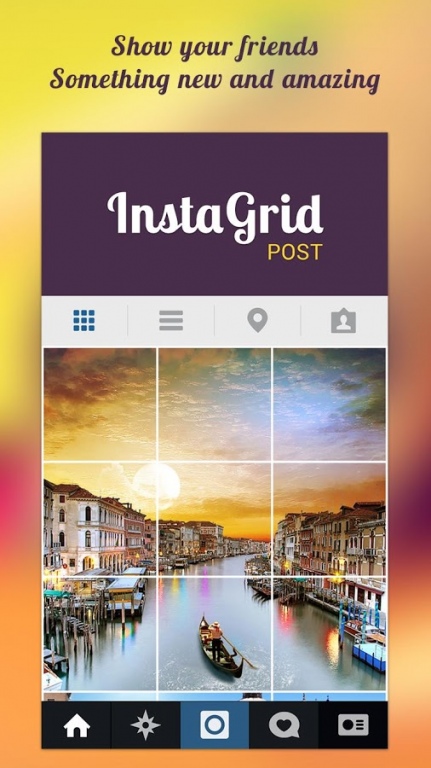
Everyone upload their photo or pic on instagram and we just follow them but i think we should now share our photo in unique style - use insta grid post and make partition of photo and then this app will post that parts of pic one by one easily, now it will show a full banner or tile of that photos on your instagram profile.
Features : -
1.You can make 3 type of grids
2.app will suggest you which image to post one by one
3.Easy to crop the pic within the app
4.Create big pictures and banner pictures on Instagram.
Insta grid post introduces a totally new way of using your Instagram, wrapped in simple and easy to use design. Don't miss the chance to express yourself by adorning your profile page and posting breathtaking large scale images.
insta grid post allows you to create picture banners / tiles / grids / puzzles on your Instagram page. new looking at your Instagram profile page, insta users will see blocks / squares of different photo and then they will see your insta banner that they will see on your page.
insta grid post have all three slits offer so you can upload your grid in three types.
you don't need to use follow or like applications to get followers and following on your ig profile, just upload photos with this new style and you will get 1000 or more followers on your ig profile without using instalike and instafollow apps for followers.
Also this app works as Square for instagram and no crop for insta because in this app there is inbuilt feature to crop the selfie so that you can upload picture in square size.
Also it works as collage app so you can make a collage type grid on insta, so select any selfie and make banner of it on instagram, its really a best photo editor app.
HOW IT WORKS
1. Choose the pic from gallery or camera
2. Choose which option you want (3, 6 or 9 tile).
UPLOADING PROCESS
1. There is a grid that will appear on your chosen picture. move the grid to fit the portion of the picture that you want slit.
2. Click “Arrow button”
3. On the next page, the pieces of your puzzle are now numbered in the order that they should be uploaded. Click on number one and upload it and follow the same for remaining numbers.
4. Now open ig and click on profile tab you will see the banner in your profile.
you can share new picture just by clicking on start over button
insta grid post is a banner and tile option for Instagram.
Transform your Instagram, Facebook and even Twitter profile into a fun and creative canvas.
slit your pic now easily and make giant square image on instagram without cropping
Download Today and have some fun!
About Insta Grid Post Banner ig Tile
The company that develops Insta Grid Post Banner ig Tile is Bigger Lens LLC. The latest version released by its developer is 1.1.
To install Insta Grid Post Banner ig Tile on your Android device, just click the green Continue To App button above to start the installation process. The app is listed on our website since 2015-09-03 and was downloaded 0 times. We have already checked if the download link is safe, however for your own protection we recommend that you scan the downloaded app with your antivirus. Your antivirus may detect the Insta Grid Post Banner ig Tile as malware as malware if the download link to com.sparkleappz.instagridpost is broken.
How to install Insta Grid Post Banner ig Tile on your Android device:
- Click on the Continue To App button on our website. This will redirect you to Google Play.
- Once the Insta Grid Post Banner ig Tile is shown in the Google Play listing of your Android device, you can start its download and installation. Tap on the Install button located below the search bar and to the right of the app icon.
- A pop-up window with the permissions required by Insta Grid Post Banner ig Tile will be shown. Click on Accept to continue the process.
- Insta Grid Post Banner ig Tile will be downloaded onto your device, displaying a progress. Once the download completes, the installation will start and you'll get a notification after the installation is finished.
Program Details
System requirements
Download information
Pricing
Version History
version 1.1
posted on 2015-09-03
Fixed some crashes
Disclaimer
Official Google Play Link
We do not host Insta Grid Post Banner ig Tile on our servers. We did not scan it for viruses, adware, spyware or other type of malware. This app is hosted by Google and passed their terms and conditions to be listed there. We recommend caution when installing it.
The Google Play link for Insta Grid Post Banner ig Tile is provided to you by apps112.com without any warranties, representations or guarantees of any kind, so access it at your own risk.
If you have questions regarding this particular app contact the publisher directly. For questions about the functionalities of apps112.com contact us.
